---
updatedAt: 2025-08-27T20:11:30.000Z
agentTools:
projectIndex: https://documentation.bunnyshell.com/llms.txt
---
# Environment View
## UI & CLI
Most of the actions performed on environments are available both through the **UI** and the **CLI**, as well as through a **Public API**.
> 📘 CLI
>
> For installation instructions, please refer to the dedicated [CLI section](bunnyshell-cli).
>
> In order to use the CLI tool in scripts, you can leverage the JSON output format, by running the command with the `-o json` flag.
The available actions are only presented with the UI and CLI, as the Public API has its own dedicated documentation, the [API Reference](/reference).
## Environment Listing
The list of all environments in Bunnyshell can be viewed either in the UI or the CLI.
### UI Listing
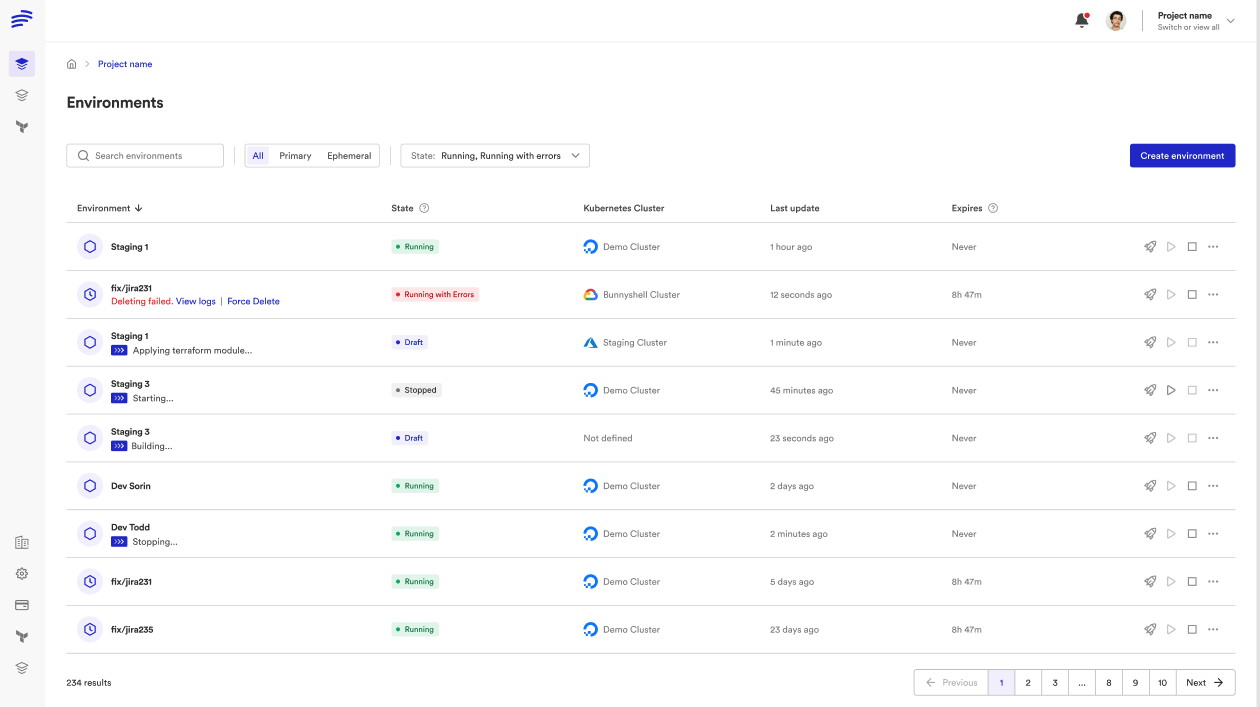
The UI displays the liste of environments within a project.
The following information can be found in this listing:
* **Environment Type**. Located on the left side is an icon that indicates whether an environment is Primary or Ephemeral.
* **Environment name**
* **State**. Bunnyshell environments can have one of the following four states: **Draft**, **Running**, **Running with Errors** or **Stopped**.
* **Kubernetes cluster**. The cluster in which the environment is / will be deployed.
* **Last update**. The time of the most recent update performed on the Environment.
* **Expires**. The time until the environment will be stopped based on the availability rules.
> 🚧 Note
>
> Whenever an action is being performed on an Environment, Bunnyshell displays the appropriate **Action Status** (e.g. **Building**, **Deploying**, **Starting** etc)
>
> In case an action fails, Bunnyshell updates the **Action Status** and provides a link to the pipeline logs.
### CLI Listing
The CLI displays a basic - and more script-tailored - version of the environments list.
The following information can be found in this listing:
* **Environment ID** - it will be used to run other commands in the context of this environment
* **ProjectID**
* **Name**
* **Namespace** - a unique identifier used by Bunnyshell for the environment, in references with other entities
* **Type** - indicates whether an environment is Primary or Ephemeral.
* **OperationStatus** - the status of the last operation ran / running on the environment.
> 📘
>
> For possible values of `OperationStatus`, please see the dedicated [CLI Documentation](bunnyshell-cli).
```text Human-readable output
$ bns environments list
EnvironmentID | ProjectID | Name | Namespace | Type | OperationStatus
adXkOW6X6b | DEKr5YlrPp | Documentation env | 23tv3u | primary | ready
l4DA0yRxzN | DEKr5YlrPp | Demo EaaS | 22vzfz | primary | deployment_failed
b1Xa38Rx8Y | DEKr5YlrPp | Staging 1 | ylj6in | primary | ready
5LX0mZAEGN | DEKr5YlrPp | Staging 2 | gkqma6 | primary | ready
e3xQyYjxBK | DEKr5YlrPp | Dev Michael | w4r6nt | primary | running
A5EWG8pEj3 | DEKr5YlrPp | Dev Sandra | vcfasy | primary | ready
8AEJQ1oXW7 | DEKr5YlrPp | Bunnyshell Demo Books | 2nhc3f | primary | building
Page 1/1 with 7 results
```
```text JSON output
$ bunnyshell-cli environments list -o json
{
"_embedded": {
"item": [
{
"id": "adXkOW6X6b",
"name": "Documentation env",
"namespace": "23tv3u",
"operationStatus": "ready",
"project": "DEKr5YlrPp",
"type": "primary"
},
{
"id": "l4DA0yRxzN",
"name": "Demo EaaS",
"namespace": "22vzfz",
"operationStatus": "deployment_failed",
"project": "DEKr5YlrPp",
"type": "primary"
},
{
"id": "b1Xa38Rx8Y",
"name": "Staging 1",
"namespace": "ylj6in",
"operationStatus": "ready",
"project": "DEKr5YlrPp",
"type": "primary"
},
{
"id": "5LX0mZAEGN",
"name": "Staging 2",
"namespace": "gkqma6",
"operationStatus": "ready",
"project": "DEKr5YlrPp",
"type": "primary"
},
{
"id": "e3xQyYjxBK",
"name": "Dev Michael",
"namespace": "w4r6nt",
"operationStatus": "running",
"project": "DEKr5YlrPp",
"type": "primary"
},
{
"id": "A5EWG8pEj3",
"name": "Dev Sandra",
"namespace": "vcfasy",
"operationStatus": "ready",
"project": "DEKr5YlrPp",
"type": "primary"
},
{
"id": "8AEJQ1oXW7",
"name": "Bunnyshell Demo Books",
"namespace": "2nhc3f",
"operationStatus": "building",
"project": "DEKr5YlrPp",
"type": "primary"
}
]
},
"itemsPerPage": 30,
"page": 1,
"totalItems": 7
}
```
## Environment Details
Details for the environment are provided.
### UI Details
This screen contains information regarding the Environment and its components (Applications, Services, Helm Charts, Kubernetes Manifests or Terraform Modules), as well as the resources created by the components.
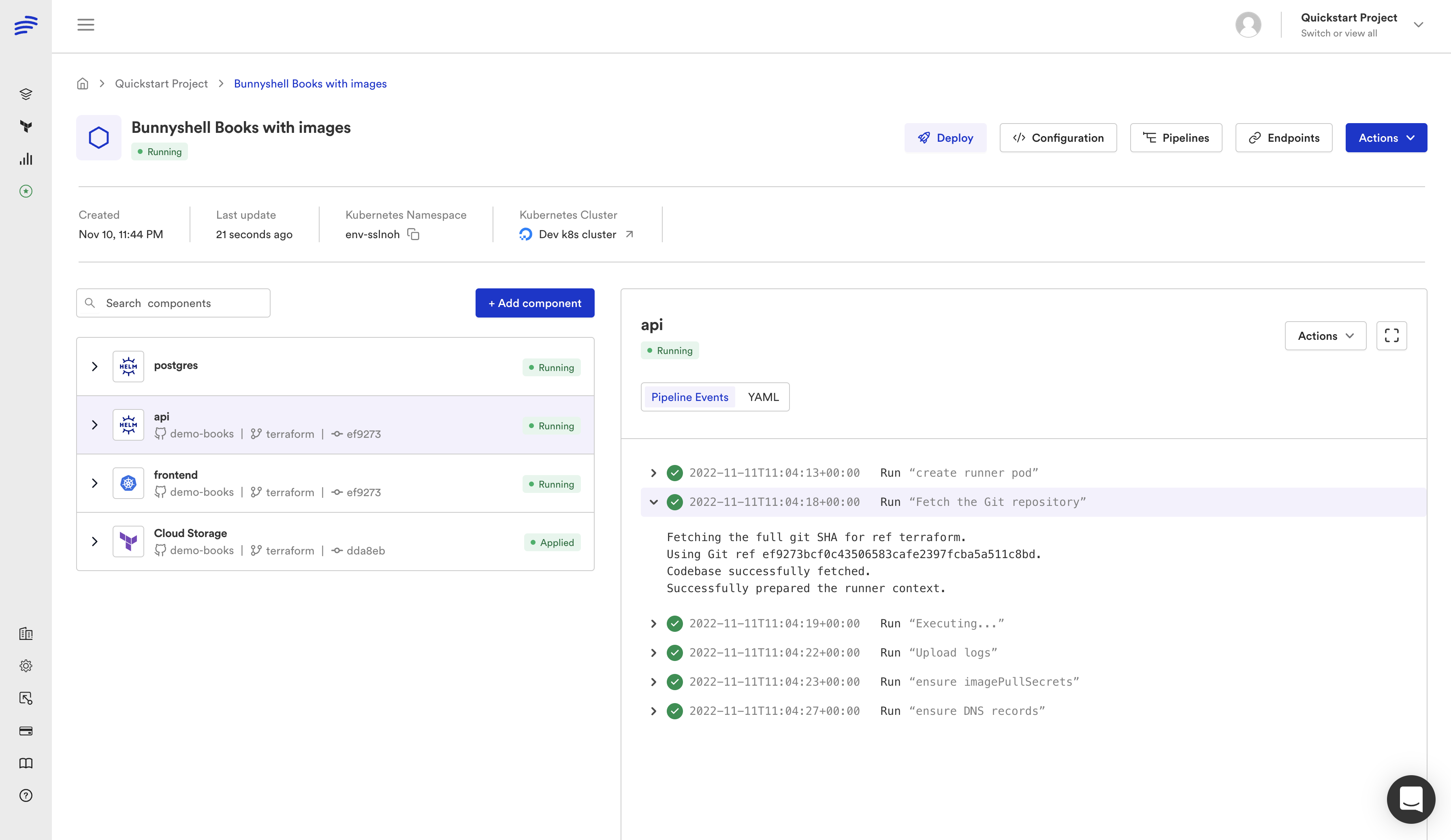
**The following can be accomplished** from the UI Details screen:
* Access information regarding individual environments and their respective components
* Edit the environment definition, [the `bunnyshell.yaml` file](environment-definition)
* Add additional components (Helm Charts, Kubernetes Manifests, Docker Compose based, Terraform Modules etc.)
* Clone environments
* View resources created by components
* View the deployment / workflow logs
* View the Kubernetes container logs & events, real-time
* Change environment settings
**Environment Details** are located in the upper part of the main interface and include the following:
* **Date of creation**
* **Blueprint** (only displayed for Ephemeral Environments). The name of the primary environment used as blueprint for creating the ephemeral environment.
* **Last update**. The time since the last update performed.
* **Kubernetes namespace**. The Kubernetes namespace created by Bunnyshell for the Environment in question.
* **Kubernetes cluster**. The cluster in which the environment will be deployed.
**Component Details** include the following:
* **Component Name**
* **Component Source** - Displayed in the icon to the left of the Component name
* **Git provider**
* **Git repository**
* **Git branch**
* **Git commit SHA**, with a link towards the commit
* **Remote Development Status**. Available only for components that are in remote development;
* **Service and Version** - Available only for components added from a public Docker registry).
* **State** - Bunnyshell environments can have one of the following four states:
* **Draft** - The Environment is ready to be deployed for the first time.
* **Error** - At least one environment component is in Error status.
* **Running** - All environment components are running correctly.
* **Stopped** - All the environment components are stopped.
* **Sync Status** - Shows whether the last commit on the component branch has been deployed, or not.
* **Last update**. The time since the last update performed on the component. Any changes in the component code (deploy code/commit), as well as changes in the settings of the component, are considered updates.
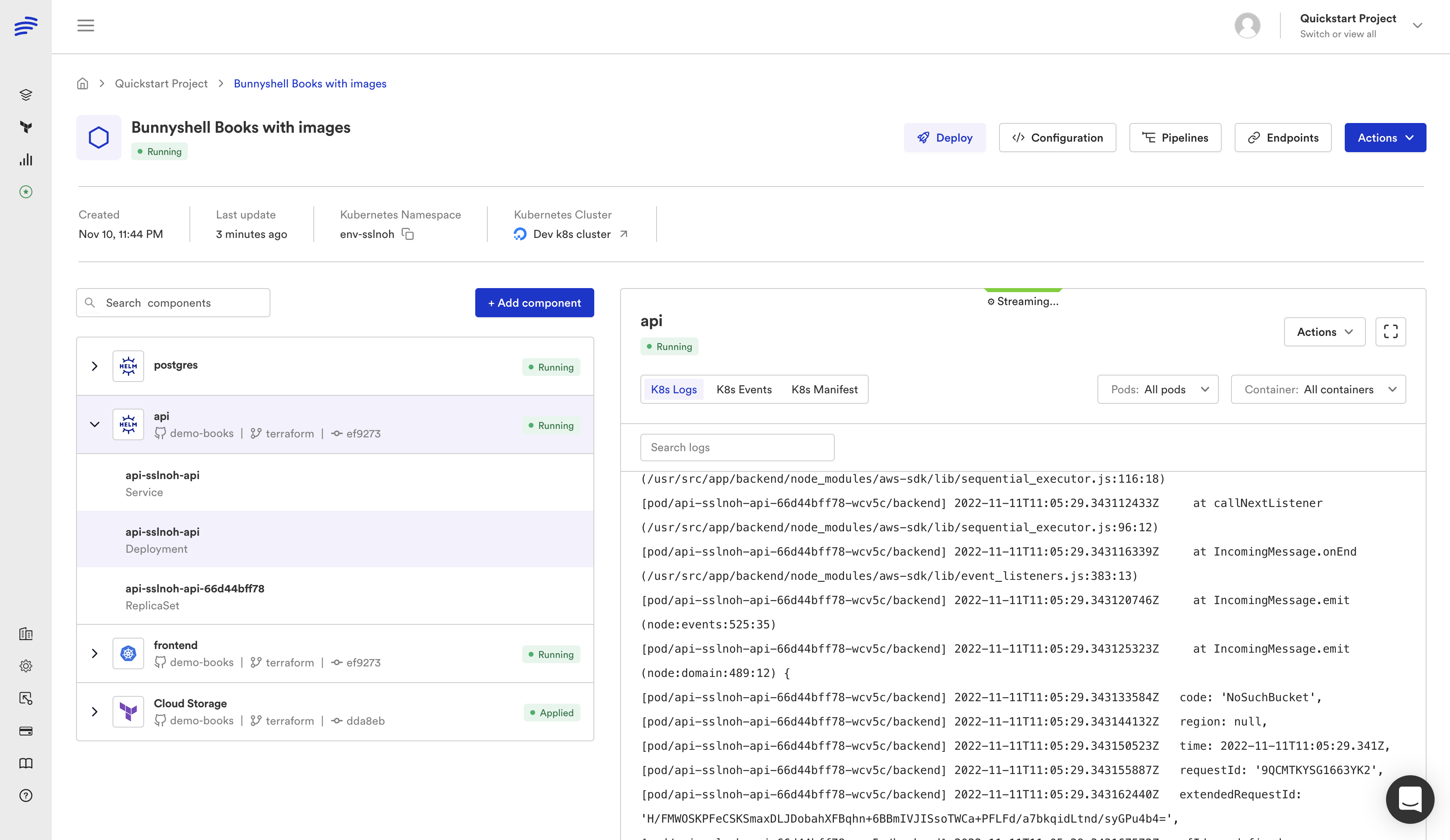
**Component Resources** can be displayed for a Component, upon clicking on it.
* for deployable components, the Kubernetes resources will be displayed.
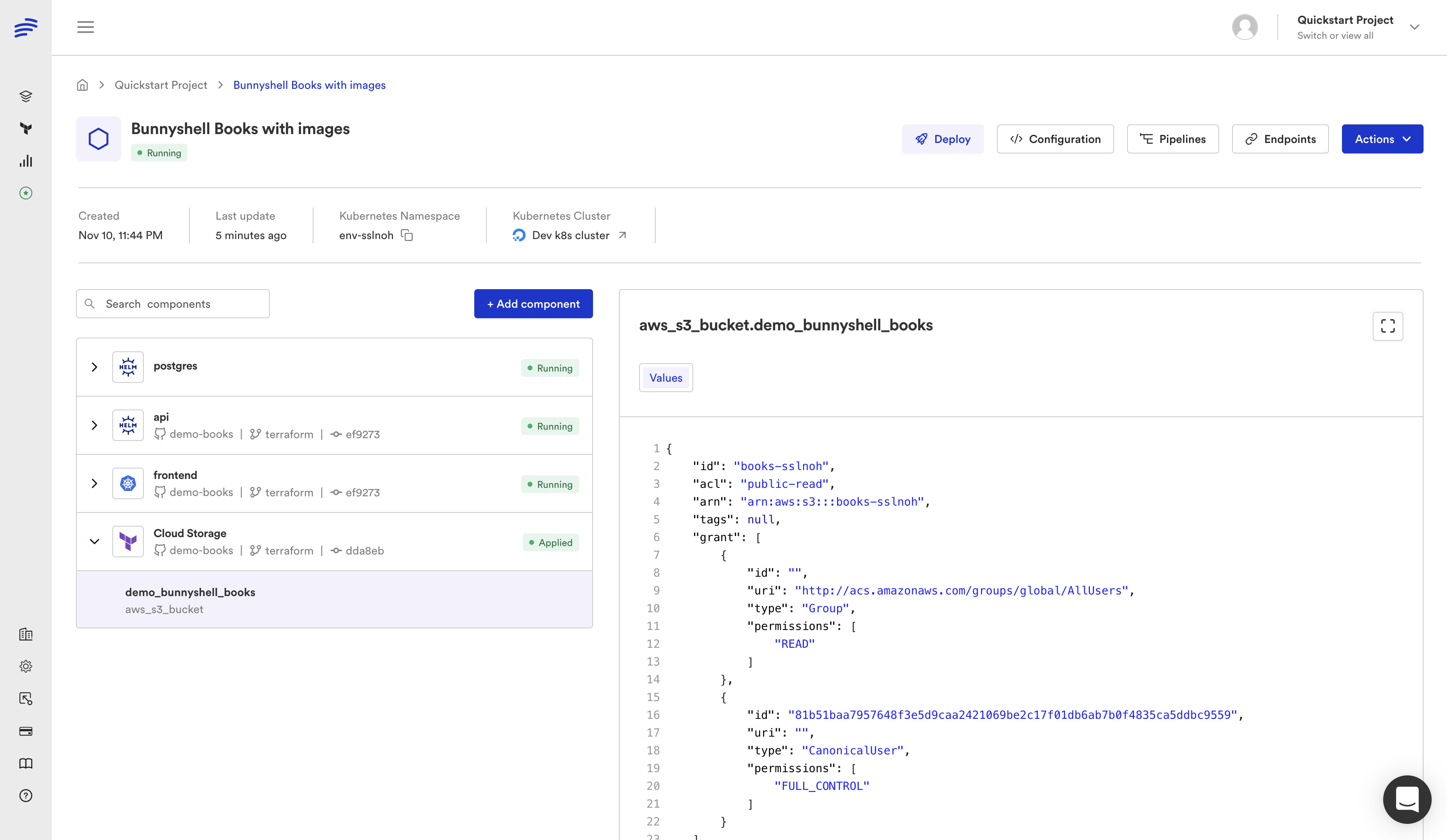
* for Terraform Modules, resources created upon applying the module will be displayed.
When selecting a Resource with containers, you will be able to see logs from Kubernetes containers. For all Kubernetes Resources, you will be able to see Kubernetes events and their manifest.
When selecting the Terraform Module, the list of Terraform-created Resources loads beneath.
### CLI Details
The Bunnyshell CLI displays the bare minimum needed as information for the `environment show` command. The `--id` option is mandatory for this command.
The following information can be found in the details:
* **Environment ID** - it will be used to run other commands in the context of this environment
* **ProjectID**
* **Name**
* **Namespace** - a unique identifier used by Bunnyshell for the environment, in references with other entities
* **Type** - indicates whether an environment is Primary or Ephemeral.
* **OperationStatus** - the status of the last operation ran / running on the component.
* **Components** - the number of the components for the environment.
> 📘
>
> For possible values of `OperationStatus`, please see the dedicated [CLI Documentation](bunnyshell-cli).
```text Human-readable output
$ bns environments show --id e3xQyYjxBK
EnvironmentID | e3xQyYjxBK
ProjectID | DEKr5YlrPp
Name | Dev Michael
Namespace | w4r6nt
Type | primary
Components | 2
OperationStatus | stopped
```
```text JSON output
$ bunnyshell-cli environments show --id e3xQyYjxBK -o json
{
"id": "e3xQyYjxBK",
"name": "Dev Michael",
"namespace": "w4r6nt",
"operationStatus": "stopped",
"project": "DEKr5YlrPp",
"totalComponents": 2,
"type": "primary"
}
```
In order to get details regarding the components, you must run the `components list` command.
The following information can be found in the component listing:
* **Component ID** - it will be used to run other commands in the context of this environment
* **Environment ID**
* **Name**
* **Namespace** - a unique identifier used by Bunnyshell for the environment, in references with other entities
* **Type** - indicates whether an environment is Primary or Ephemeral.
* **OperationStatus** - the status of the last operation ran / running on the component.
* **ClusterStatus** - the status, as fetched from the cluster.
> 📘
>
> For possible values of `OperationStatus` and `ClusterStatus`, please see the dedicated [CLI Documentation](bunnyshell-cli).
```text Human-readable output
$ bns components list --environment 8AEJQ1oXW7
ComponentID | EnvironmentID | Name | OperationStatus | ClusterStatus
8bm4KVjGWK | 8AEJQ1oXW7 | backend | running | running_ok
wozKXWrGq9 | 8AEJQ1oXW7 | db | running | running_ok
pYmOK4MmrN | 8AEJQ1oXW7 | frontend | running | running_ok
Page 1/1 with 3 results
```
```text JSON output
$ bunnyshell-cli components list --environment 8AEJQ1oXW7 -o json
{
"_embedded": {
"item": [
{
"clusterStatus": "running_ok",
"environment": "8AEJQ1oXW7",
"id": "8bm4KVjGWK",
"name": "backend",
"operationStatus": "running",
"syncPath": null
},
{
"clusterStatus": "running_ok",
"environment": "8AEJQ1oXW7",
"id": "wozKXWrGq9",
"name": "db",
"operationStatus": "running",
"syncPath": null
},
{
"clusterStatus": "running_ok",
"environment": "8AEJQ1oXW7",
"id": "pYmOK4MmrN",
"name": "frontend",
"operationStatus": "running",
"syncPath": null
}
]
},
"itemsPerPage": 30,
"page": 1,
"totalItems": 3
}
```